Customised Automation · AI Document Intelligence

DocuScanAI : Scanned + AI reviewed data in your system

Re-typing handwritten receipts, application forms is slow, time-consuming, repetitive, and prone to errors. Many business operations still rely on paper-based records, leaving valuable information trapped in physical documents until it is manually digitized. This slows down workflows, increases administrative effort, and makes data harder to access, process, and use efficiently.


DocuScanAI is offered as a customized software development service that extends our core technology to build an internal tool tailored to your business needs. The solution is designed around your existing forms, integrates with your legacy systems, and is deployed on your server, giving you a solution that fits your workflows and infrastructure.


DocuScanAI automates data capture from scanned documents. It extracts individual fields from handwritten or printed records and maps the captured data directly to the appropriate fields in your existing system. Uncertain values are automatically flagged for review, allowing your team to focus only on entries that need verification.

✓Works with your existing printed forms and receipts
✓Define each field to focus in a template
✓Reads handwritten and printed entries
✓Automatically straightens tilted or shifted scans
✓Validates dates, amounts and IDs by field type
✓Flags low-confidence values for review
✓Choose cloud or offline OCR engines
✓Exports to your existing system or simple Excel file

What goes in, what comes out

Scanned PDF / Image / WebCam
+
OCR & AI validation
+
Human correction
=
Data in your system

How it works

1

Scan & upload

Upload scanned PDFs of your existing forms or receipts. No change to your paper format is needed.

2

Align & locate fields

The scan is straightened and each field is located using the template you defined once.

3

Read & validate

Handwritten and printed entries are read and checked by field type, such as dates, amounts and IDs.

4

Review & export

Low-confidence values are flagged for a quick check, then rows are exported to your own Excel layout.


DocuScanAI in Action — Live Software Screenshots
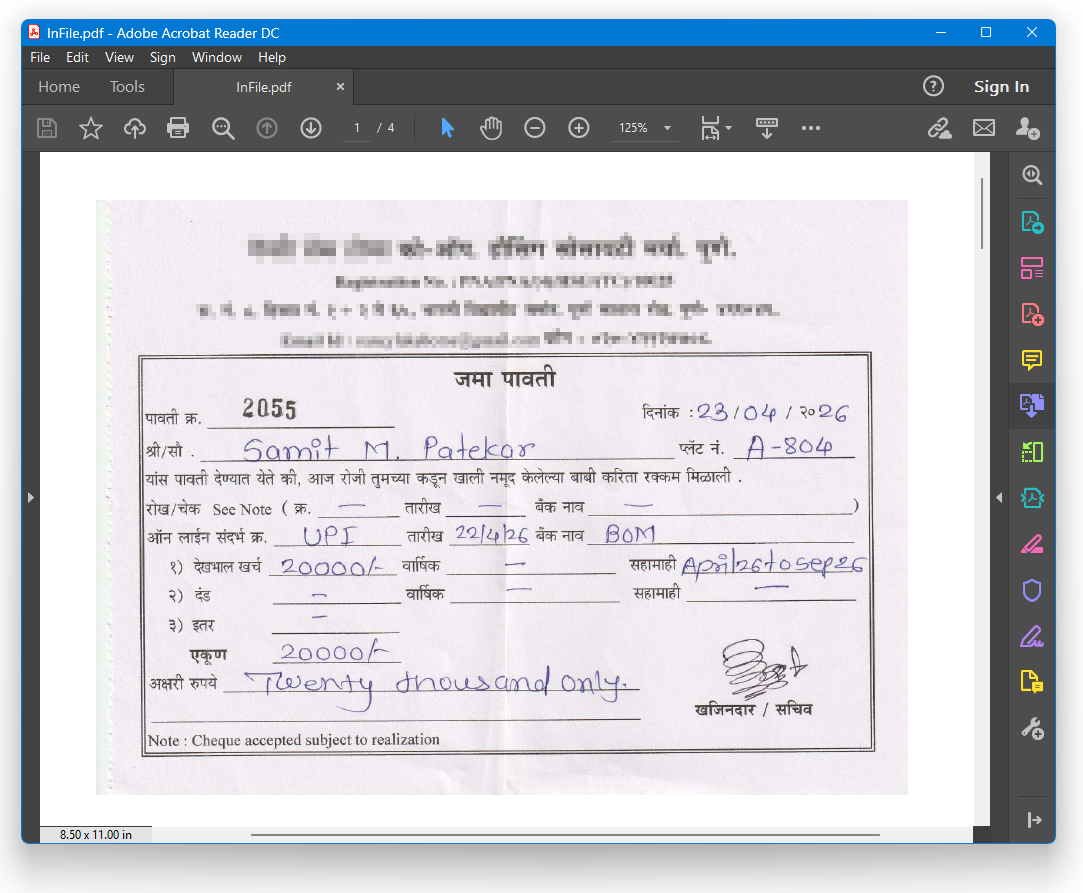
Source scanned data

Step 1 · Source multi page scanned PDF to process
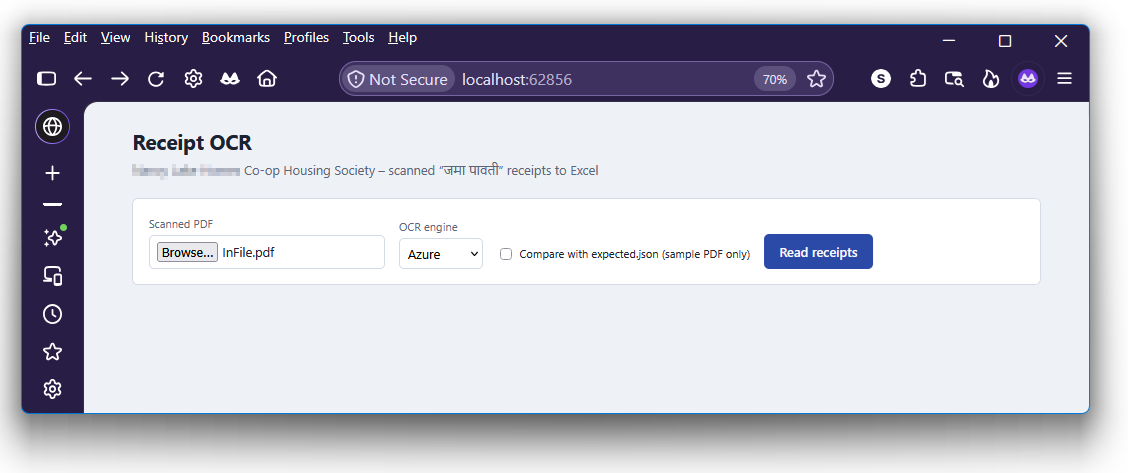
Upload the file to server

Step 2 · Upload the PDF file & click Read receipts
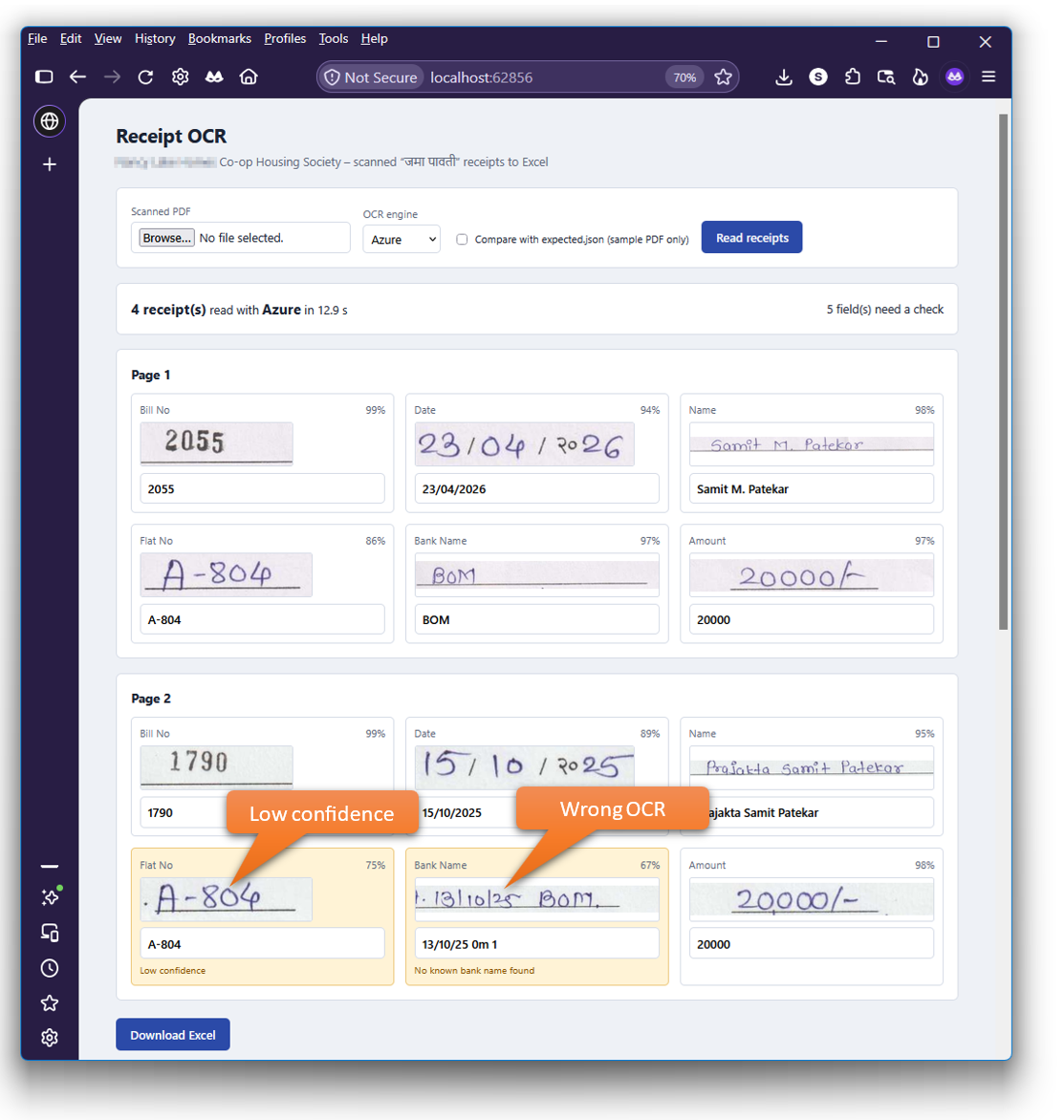
Input file scanned and converted

Step 3 · System scans and identify values in each fields & displays confidence and error for human review
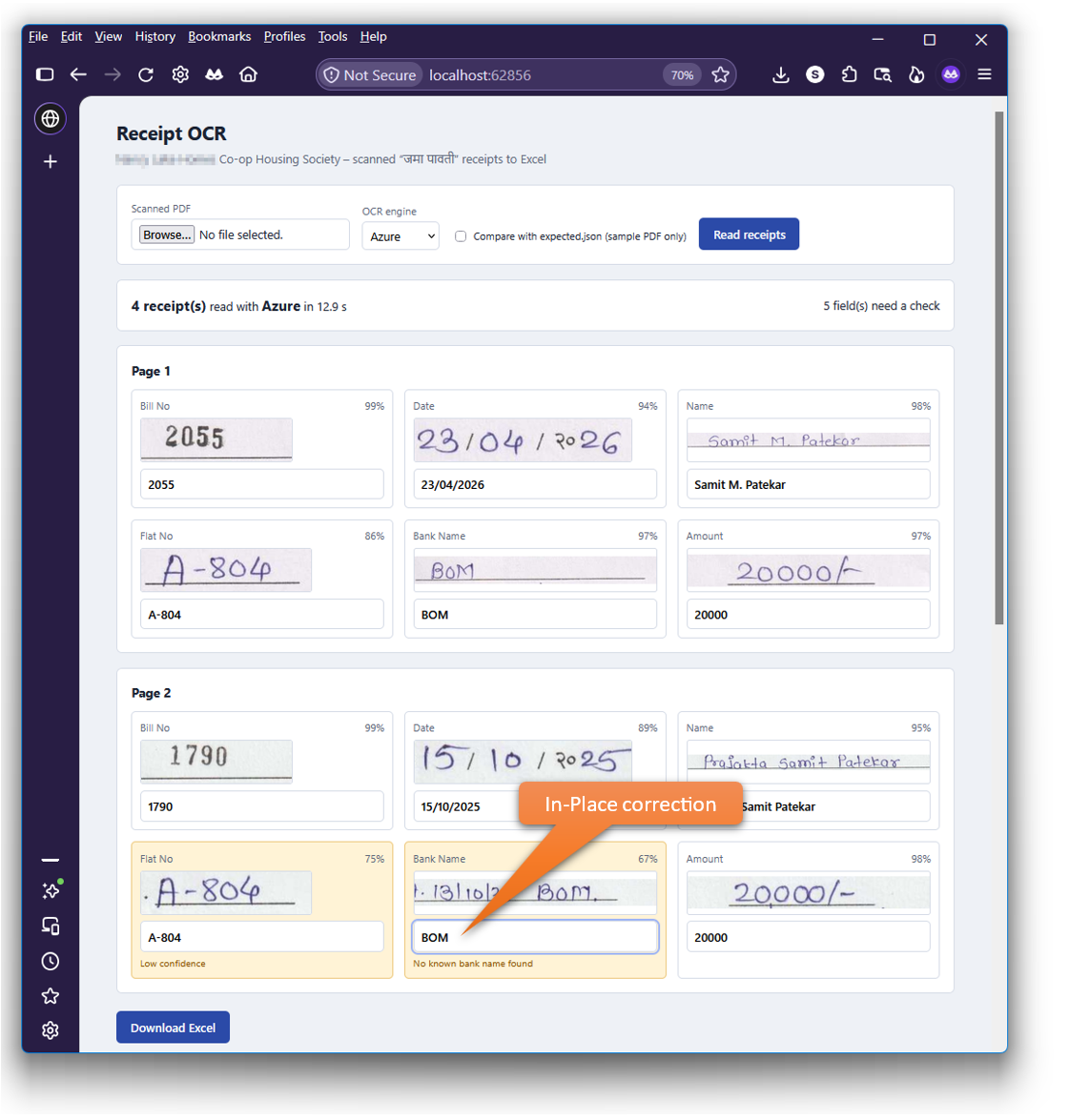
Inplace corrections

Step 4 · User does the in-place correction for required fields
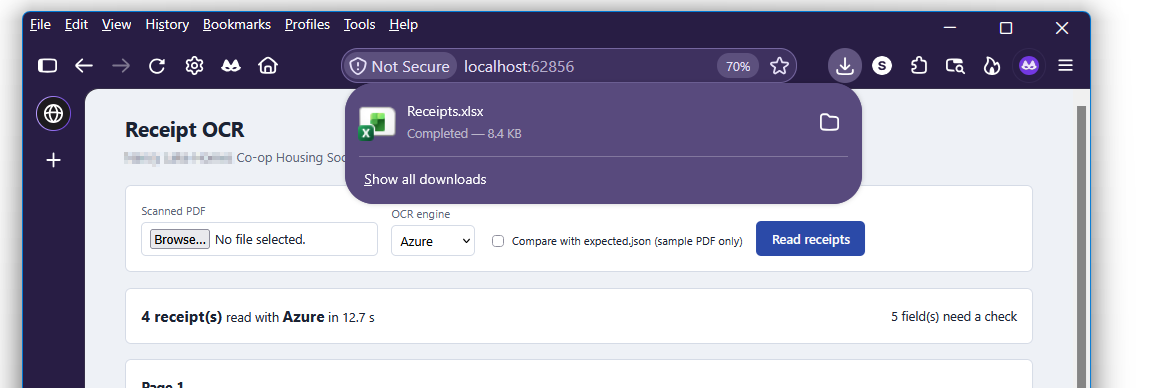
User download scanned data

Step 5 · User downloads the excel file
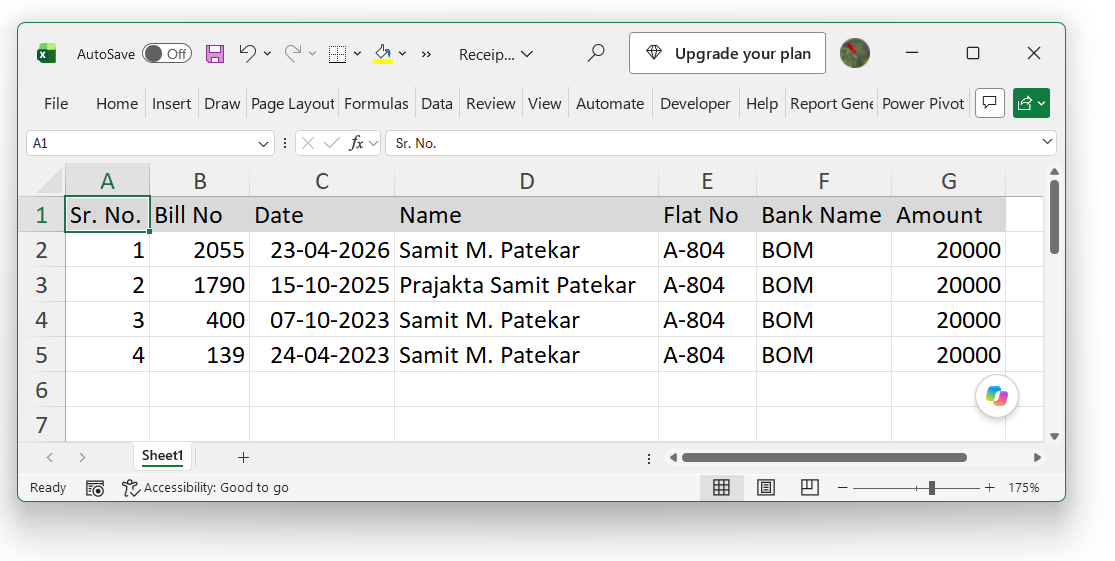
Final excel file for review

Step 6 · The downloaded excel file for final review

Use various OCR options

OPTION A

Cloud OCR

Uses Azure AI Document Intelligence for strong handwriting recognition. Document images are sent to the cloud service, so an internet connection is required.

OPTION B

Offline OCR

Runs entirely on your own server, for documents that cannot leave your premises. Accuracy depends on the engine and hardware, and is validated on your sample documents during the proof of concept.

Highly configurable system, can be updated for any source of input, any OCR provider, save values directly to your legacy sustem.

Your team stays in control. Values with low confidence are flagged for review before they reach in your system. We validate the setup on your own sample documents during a risk-free proof of concept.

Industries

Built for teams that still run on paper.

DocuScanAI is valuable wherever handwritten or printed forms must be turned into structured Excel data.

🧬

Life Sciences & CROs

Raw-data sheets, sample receipt registers, consent form entries.

💹

Financial & Banking

Application forms, deposit slips, paper receipts, KYC forms.

⚖️

Legal Services

Client intake forms, acknowledgement forms, registers.

🏥

Healthcare

Patient registration, lab requisition and consent forms.

💻

IT & Software

Asset handover, access request and inventory forms.

🏗️

Real Estate & Construction

Housing society receipts, material receipt notes, site checklists.

🚚

Logistics & Supply Chain

Delivery slips, gate-entry registers, weighbridge slips.

🏛️

Government & Public Sector

Application forms, citizen-service forms, statutory registers.

Get Started
Tell us about the forms and receipts you manually type today. We'll start with a risk-free proof-of-concept on your own sample documents.

✓No need to abandon your existing system
✓Start with a working POC, not a commitment
✓Step-by-step implementation, minimal disruption
✓Mobile:+91 9822 393671
✓LinkedIn:ReflectMyIdea
✓ Thank you for reaching out — we'll be in touch within 24 hours.

Frequently Asked Questions

Reads handwritten and printed entries from scanned documents and use AI to improve accuracy before recording them in your system.
Any structured form or receipt with fixed fields, once each field is defined on a template along with its type. It is used to improve the accuracy.
Its highly accurate, however it depends on handwriting quality and the OCR engine. Uncertain values are automatically flagged for review and in-place correction. We measure accuracy on your own samples during the POC and connect to suitable OCR engine to improve accuracy.
Yes. Low-confidence fields are highlighted and values can be corrected before export.
An offline mode keeps documents on your premises. Azure AI Document Intelligence use cloud. DocuScanAI can use both.
Yes, it automatically aligns the scans before processing.
Yes, dates, amounts and IDs are validated by field type.
Any language supported by OCR engine. We can also connect to OCR engine tuned for your language.